
Python For Loop ( Class 11)

 Note:- Read it Carefully:

Python Loops

The flow of the programs written in any programming language is sequential by default. Sometimes we may need to alter the flow of the program.

 The execution of a specific code may need to be repeated several numbers of times.

For this purpose, The programming languages provide various types of loops which are capable of repeating some specific code several numbers of times. 


Consider the following diagram to understand the working of a loop statement.
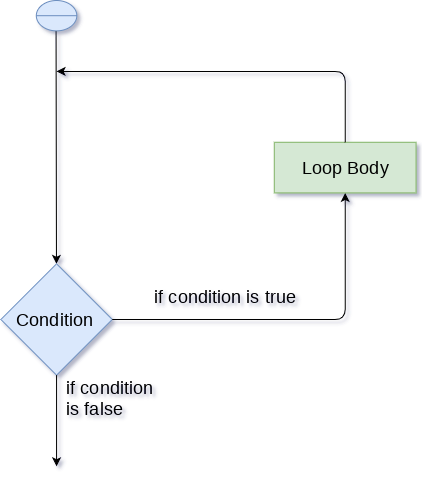
Python Loops

Why we use loops in python?

The looping simplifies the complex problems into the easy ones.


 It enables us to alter the flow of the program so that instead of writing the same code again and again, we can repeat the same code for a finite number of times. 


For example, if we need to print the first 10 natural numbers then, instead of using the print statement 10 times, we can print inside a loop which runs up to 10 iterations.

Advantages of loops

There are the following advantages of loops in Python.

  1. It provides code re-usability.
  2. Using loops, we do not need to write the same code again and again.
  3. Using loops, we can traverse over the elements of data structures (array or linked lists).

There are the following loop statements in Python.

Loop StatementDescription
for loopThe for loop is used in the case where we need to execute some part of the code until the given condition is satisfied. The for loop is also called as a per-tested loop. It is better to use for loop if the number of iteration is known in advance.
while loopThe while loop is to be used in the scenario where we don't know the number of iterations in advance. The block of statements is executed in the while loop until the condition specified in the while loop is satisfied. It is also called a pre-tested loop.
do-while loopThe do-while loop continues until a given condition satisfies. It is also called post tested loop. It is used when it is necessary to execute the loop at least once (mostly menu driven programs).

Comments

  1. Please Write some blogs about libraries of python with some libraries like random , matplotlib.

    ReplyDelete
  2. I can give you the address Here you will learn how to do it correctly. Read and write something good. click here

    ReplyDelete

Post a Comment

Popular posts from this blog

Input Devices

Input Devices(इनपुट डिवाइस ) Input device enables the user to send data, information or control signals to computer. Central processing unit of computer receives the input and processes it to produce output. Some of the popular input devices are: Keyboard Mouse Scanner Joystick Light Pen Track ball Digitizer Microphone Magnetic Ink Character Recognition (MICR) Optical Character Reader (OCR) Keyboard (कीबोर्ड ) It is a basic input device that is used to enter data by pressing keys. It has different sets of keys for letters, numbers, characters and functions. QWERTY keyboard is the commonly used keyboard to enter data. Mouse (माउस) It is a hand held input device. It is used to move cursor or pointer across the screen. It generally has left and right button and a scroll wheel between them. Laptop computers come with a touch pad that works as a mouse. It lets you control the movement of cursor or pointer by moving your finger over the touchpad. Scanner (...

Memory Hierarchy

Memory Hierarchy A memory unit is an essential component in any digital computer since it is needed for storing programs and data. Typically, a memory unit can be classified into two categories: The memory unit that establishes direct communication with the CPU is called  Main Memory . The main memory is often referred to as RAM (Random Access Memory). The memory units that provide backup storage are called  Auxiliary Memory . For instance, magnetic disks and magnetic tapes are the most commonly used auxiliary memories. Apart from the basic classifications of a memory unit, the memory hierarchy consists all of the storage devices available in a computer system ranging from the slow but high-capacity auxiliary memory to relatively faster main memory. The following image illustrates the components in a typical memory hierarchy. Auxiliary Memory Auxiliary memory is known as the lowest-cost, highest-capacity and slowest-access storage in a computer system....

History of Computers

Hello Students For Class XI(OSVN Inter College) History of Computers The first counting device was used by the primitive people. They used sticks, stones and bones as counting tools. As human mind and technology improved with time more computing devices were developed. Some of the popular computing devices starting with the first to recent ones are described below; Abacus The history of computer begins with the birth of abacus which is believed to be the first computer. It is said that Chinese invented Abacus around 4,000 years ago. It was a wooden rack which has metal rods with beads mounted on them.  The beads were moved by the abacus operator according to some rules to perform arithmetic calculations. Abacus is still used in some countries like China, Russia and Japan. An image of this tool is shown below; Napier's Bones It was a manually-operated calculating device which was invented by John Napier (1550-1617) of Merchiston. In this calculating t...